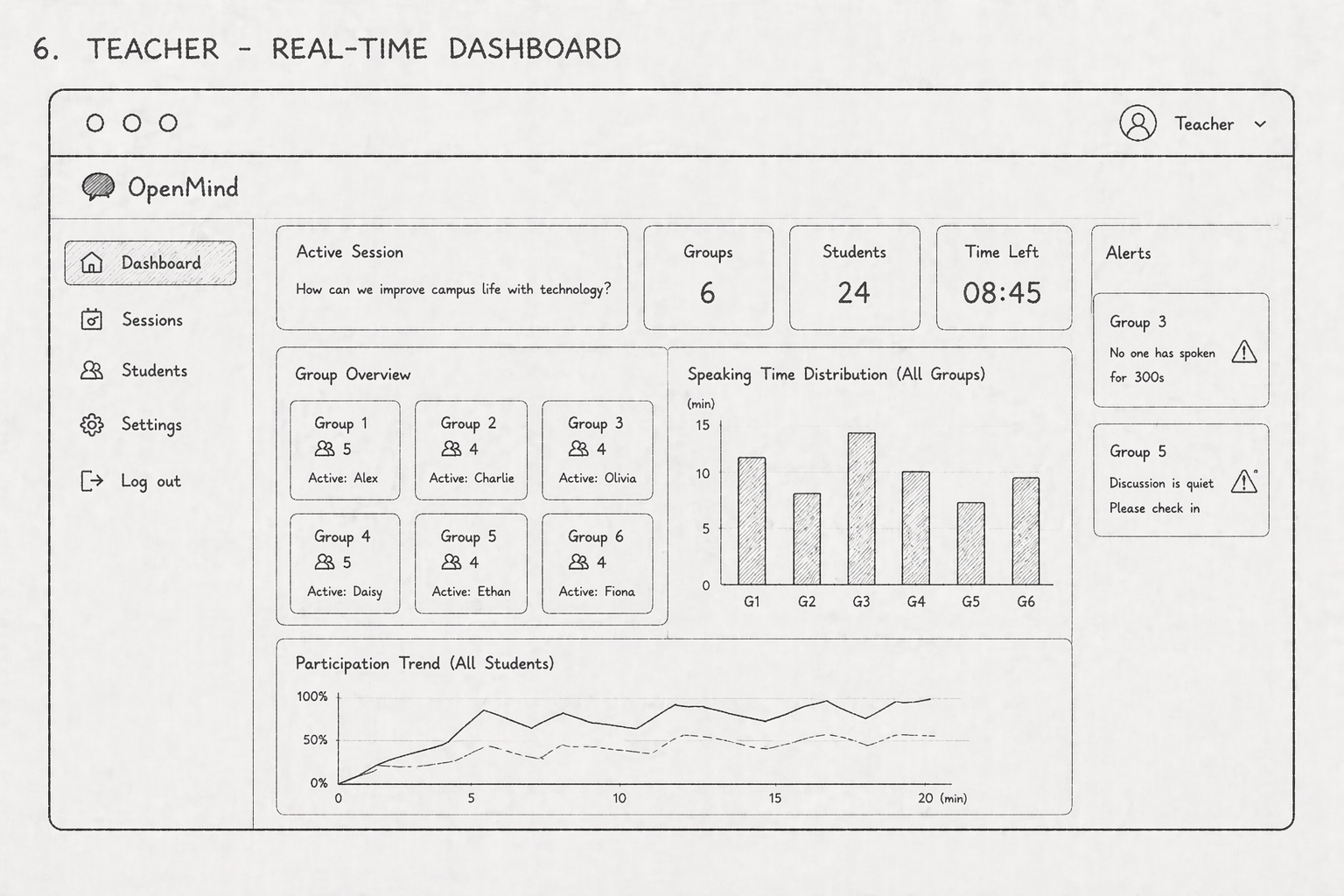
Enhancing student participation
through thoughtful digital interaction.

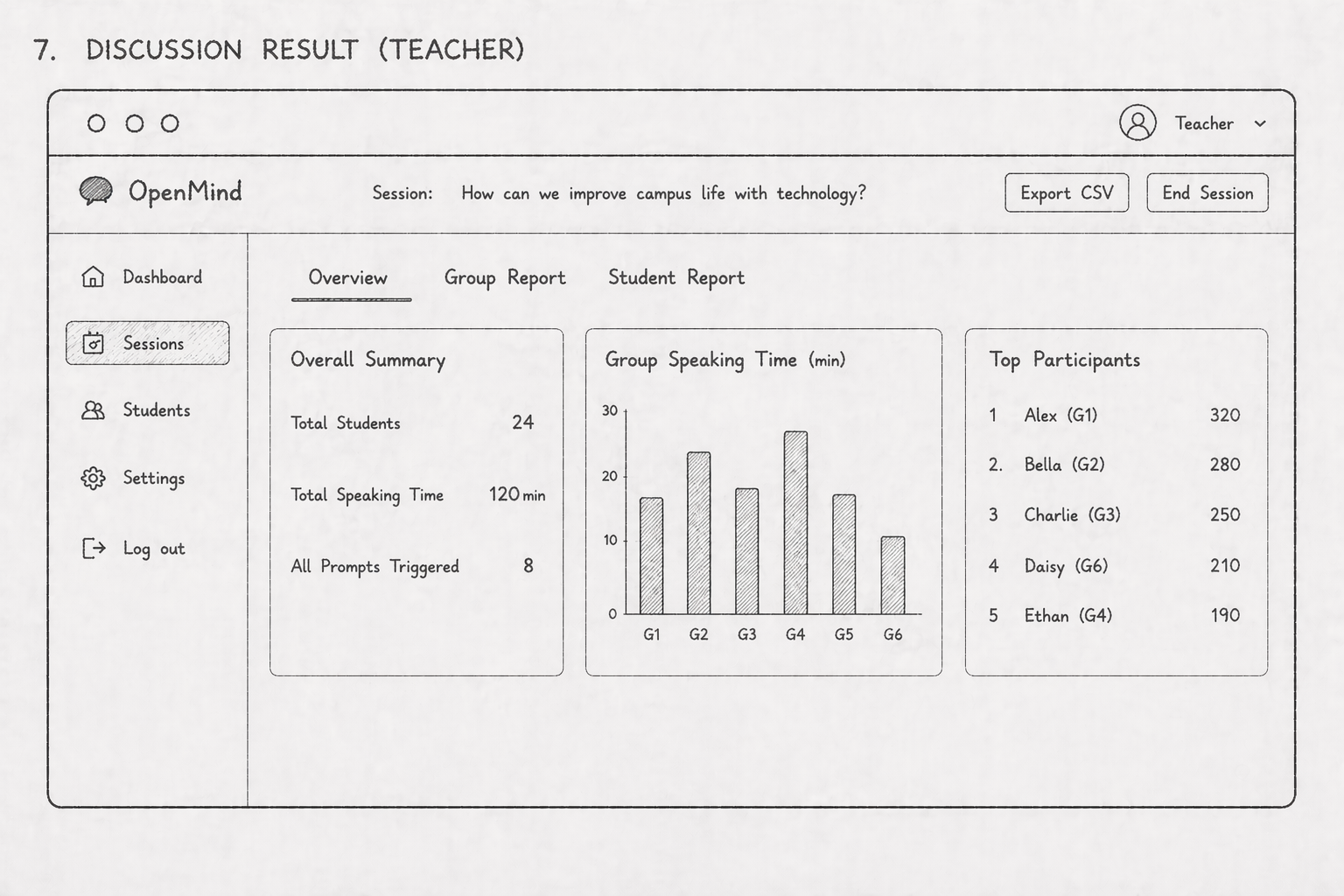
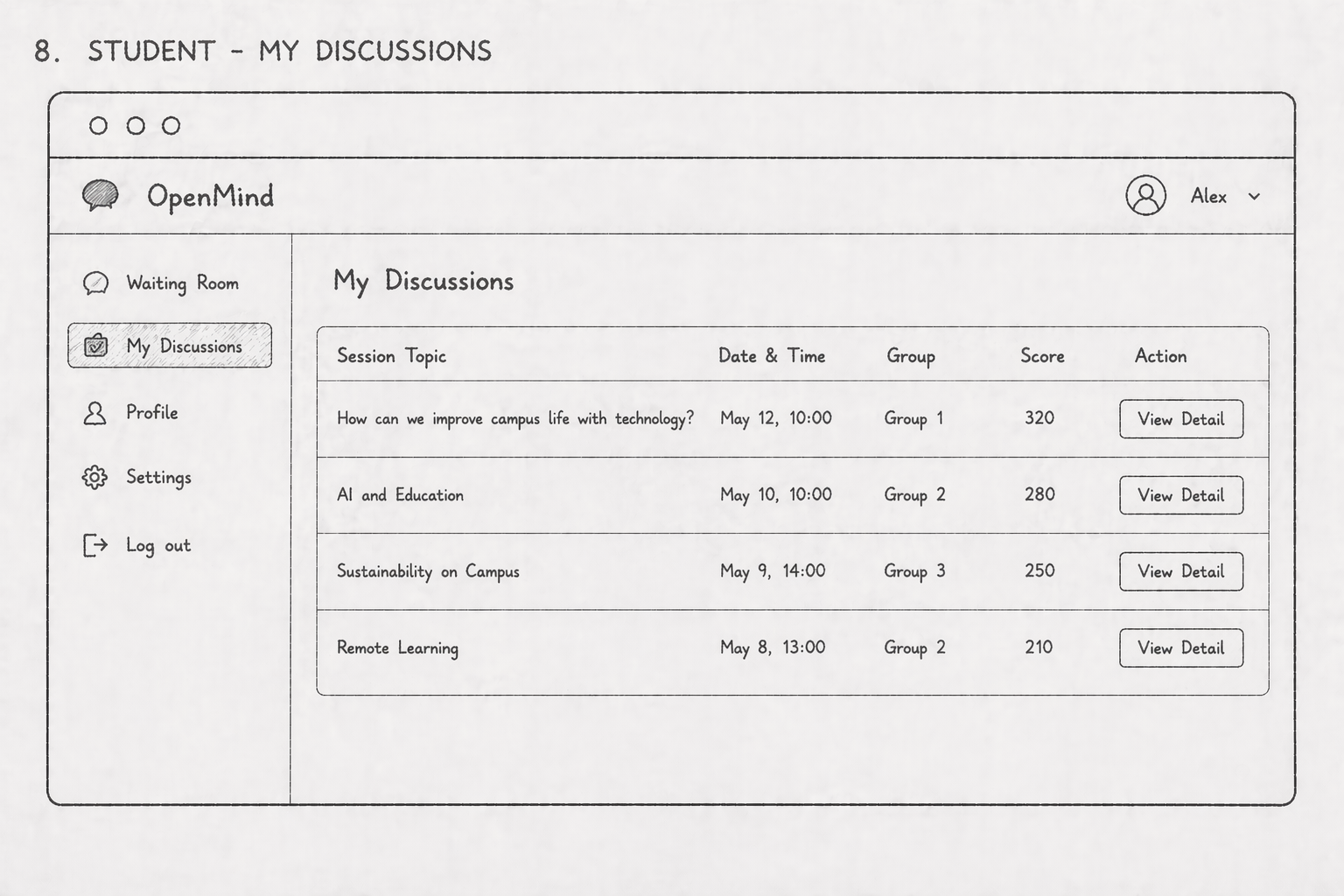
We are designing a web-based system that helps students express ideas more comfortably and helps teachers better understand participation, engagement, and discussion quality.

Open your mind, Start the discussion.

Drag the purple arrow all the way to the right to reveal how OpenMind helps every voice feel easier to hear.

Slide to continue
Design Focus
Reduce speaking anxiety student-first

We focus on lowering the emotional pressure of classroom discussion by giving students a gentler, more supportive way to join in. The system is designed to help quieter learners organise ideas, build confidence gradually, and contribute without feeling forced into immediate speaking.

Tap the icons
Track participation fairly teacher insight

We want teachers to see participation more clearly and more fairly, rather than relying only on who appears the loudest in the room. By making contribution patterns visible, the platform helps educators notice quieter students, compare group balance, and respond with better-informed support.

Tap the icons
Support shy students inclusive design

Inclusive discussion means designing for students who may hesitate, need more preparation time, or prefer lower-pressure entry points. This focus ensures that thoughtful but less outspoken learners still have space to be seen, heard, and meaningfully included in group interaction.

Tap the icons
Explore More
Motivation Timeline Related Products / Research Insights Evidence of live
Personas / Journey Map
Reflection / Ideation
Technical / Evaluation
Team
Project Motivation

Why this project matters.

We chose XJTLU group discussions as our main research direction because limited participation remains a common issue in traditional language classrooms, especially where anxiety, confidence, and communication imbalance affect who gets heard.

In many classroom discussions, conversation is often dominated by one or two confident speakers. As a result, other students may remain silent because of anxiety, lack of confidence, or language barriers. This imbalance can marginalise quieter participants and reduce opportunities to develop oral communication skills.

The issue is especially visible in international university classrooms, where students come from different countries and language backgrounds. In this context, nervousness can be amplified, making less confident students even more reluctant to speak. When this happens repeatedly, low-participation students may gradually become disconnected from the discussion process.

Our project aims to address this imbalance by reintegrating these marginalised participants into group discussions. We are committed to creating a human-centred and playful system combined with AI to build a more supportive and inclusive environment for classroom communication.

We want to visualise the discussion process and use charts to show the participation and contribution of different group members. In this way, both students and teachers can better understand interaction patterns during discussion. Ultimately, our goal is to encourage all members to express their ideas more actively while reducing the unease often experienced by less confident participants.

Project Timeline

A connected path that maps the project journey.

We turned the process into one continuous path so the project story feels like a small adventure, moving from the starting point through research, discovery, validation, and final showcase milestones.

Bird guide on the timeline path
Omi Guide
Start sign
Kickoff
Treasure chest milestone
Findings
Coin milestone
Checkpoint
Trophy milestone
Showcase
Star milestone
Reward
Finish success flag
Finish
1 2 3 4 5 6 7 8
Level 1 To 3 The early route moves from kickoff into discovery.

The first part of the map covers project framing, initial topic direction, and early research collection, with the bird guide leading the way into the first key findings.

Level 4 To 6 Midway rewards represent evidence, validation, and progress.

The chest, coin, and numbered stops reflect interview insights, questionnaire results, and the way research evidence helped us refine design priorities more confidently.

Level 7 To 8 The last stretch leads into showcase and final delivery.

The trophy, star, and finish point mark the later milestones of testing, presentation, and final portfolio storytelling, turning the whole process into a completed journey map.

This path-style timeline keeps the section playful while making the project progression easier to follow at a glance, turning separate research and design activities into one connected visual journey.

Related Products

What existing tools inspired us.

We analysed several classroom discussion and participation tools to understand their strengths, limitations, and the design ideas they offer for a more inclusive discussion support system.

Related Product
Wooclap
๐Ÿ’ฌ ๐Ÿ“Š โšก
Visit website
Best inspiration for low-pressure participation and fast classroom interaction.
๐Ÿ’กInspiration
  • Wooclap inspired us to design a low-pressure participation mechanism, so shy students can join discussion more comfortably before speaking openly.
๐Ÿ˜ŠAdvantages
  • Encourages shy students to participate through anonymous or low-pressure responses
  • Supports live interaction with polls, quizzes, and Q&A during class discussion
  • Helps teachers quickly collect and view studentsโ€™ responses in real time
๐Ÿ˜ขDisadvantages
  • Focuses more on whole-class interaction than deep small-group discussion
  • Limited support for tracking the quality of each studentโ€™s verbal contribution
  • Gamification and group progress visualization are not its main strengths
Related Product
Kialo Edu
๐Ÿง  ๐Ÿ—‚๏ธ โœ๏ธ
Visit website
Useful for structured argument building, but less natural for live spoken discussion.
๐Ÿ’กInspiration
  • Kialo Edu inspired us to support shy students through a structured and less stressful discussion environment, where they can contribute at their own pace.
๐Ÿ˜ŠAdvantages
  • Supports structured discussion and argument organization
  • Helps shy students participate at their own pace in a low-pressure way
  • Encourages critical thinking through clear claim-and-response formats
๐Ÿ˜ขDisadvantages
  • Less suitable for fast real-time spoken discussion in class
  • Focuses more on text-based argument building than verbal interaction
  • Does not strongly support game-like motivation or visible group progress
Related Product
FeedbackFruits
๐Ÿ“ˆ ๐Ÿ‘ฅ โœ…
Visit website
Strong on analytics and monitoring, with less emphasis on playful motivation.
๐Ÿ’กInspiration
  • FeedbackFruits inspired us to provide teachers with participation analytics, so they can monitor each studentโ€™s contribution and better understand group discussion dynamics.
๐Ÿ˜ŠAdvantages
  • Provides teachers with participation and engagement analytics
  • Supports discussion-based learning and peer interaction
  • Helps monitor studentsโ€™ contribution patterns across activities
๐Ÿ˜ขDisadvantages
  • More focused on learning analytics than playful motivation
  • Limited support for real-time game-like group discussion experience
  • May not directly reduce the pressure felt by shy students in live discussion
Related Product
Mentimeter
๐ŸŽค โ˜๏ธ ๐Ÿ“ฑ
Visit website
Great for instant expression, but weaker for sustained small-group discussion.
๐Ÿ’กInspiration
  • Mentimeter inspired us to include simple and instant interaction features that encourage students to express ideas quickly and lower the barrier to participation.
๐Ÿ˜ŠAdvantages
  • Encourages shy students to participate through anonymous or low-pressure responses
  • Supports instant polls, Q&A, and word clouds during classroom discussion
  • Helps teachers collect and compare studentsโ€™ ideas in real time
๐Ÿ˜ขDisadvantages
  • Focuses more on quick whole-class interaction than sustained small-group discussion
  • Limited support for tracking each studentโ€™s detailed verbal contribution
  • Does not strongly support gamified progress or group-based discussion rewards
Research Insights

What the literature tells us.

We translated four key studies into four practical design insights, so each insight can directly inform the features and priorities of our classroom discussion support system.

๐Ÿ”Ž Insight 01
Teachers struggle to monitor multiple groups in real time

Teachers may find it difficult to track several discussion groups at once, which can delay intervention when participation drops or when one group becomes stagnant.

๐Ÿ“ก Theme: teacher awareness, intervention timing, and visible engagement patterns.
๐Ÿงฉ Related Requirements
๐Ÿ“ŠGlobal Monitoring Dashboard
๐Ÿ””Silence / low-activity alert
๐Ÿ“ˆParticipation trend visualization
โšกQuick intervention cues
๐Ÿ“š Citation: Ramaswami, Susnjak, & Mathrani (2023) Learning Analytics Dashboard
๐Ÿ”Ž Insight 02
AI-supported group work can become too AI-centred

In AI-supported collaboration, students may interact more with the AI tool than with peers, so the system should protect peer-to-peer discussion rather than letting AI dominate it.

๐Ÿค– Theme: peer-first collaboration, guided AI assistance, and healthier interaction patterns.
๐Ÿงฉ Related Requirements
๐ŸคPeer-first interaction design
๐Ÿ”„Turn-taking / contribution nudges
๐Ÿง Guided AI assistance
๐ŸŽฏBalanced participation prompts
๐Ÿ”Ž Insight 03
Personalized support can help language learners contribute more confidently

Digital personalization in TESOL can support learner performance and pedagogical practice, suggesting that students may benefit from adaptive prompts and individualized scaffolding.

๐Ÿช„ Theme: adaptive support, individualized guidance, and smoother entry into discussion.
๐Ÿงฉ Related Requirements
โœจPersonalized speaking support
๐ŸงญAdaptive prompts / guidance
๐Ÿ“˜Individual participation feedback
๐ŸŒ‰Bridge from private prep to group contribution
๐Ÿ“š Citation: Sartaj, Ehsan, & Barich (2026) Digital personalization in TESOL
๐Ÿ”Ž Insight 04
Speaking anxiety reduces willingness to participate

Shy or anxious learners may hesitate to speak in front of others, so they need lower-pressure ways to join discussion before they are ready to contribute openly.

๐ŸŒฑ Theme: anxiety reduction, confidence building, and safer participation pathways.
๐Ÿงฉ Related Requirements
๐ŸŒฑBalanced Participation
๐ŸงŠIce-breaking & Guidance
๐Ÿ“Anonymous / low-pressure input
๐Ÿ’›Confidence-building support
๐Ÿ“š Citation: Asysyifa, Handayani, & Rizkiani (2019) Studentsโ€™ Speaking Anxiety in EFL Classroom
๐Ÿงพ Summary of the Four Insights

Taken together, these four insights show that an effective classroom discussion system must support both teacher visibility and student confidence, while also ensuring that AI remains a supportive tool rather than the centre of interaction. The literature suggests that teachers need clearer real-time awareness across groups, shy learners need lower-pressure ways to contribute, personalized support can help language learners participate more confidently, and AI-supported collaboration should be designed to strengthen peer discussion instead of replacing it.

โญ Three Must-have Requirements
๐Ÿ“Š
Global Monitoring Dashboard
Teachers need an at-a-glance view of participation, silence, and group activity so they can intervene at the right time.
๐ŸŒฑ
Low-pressure Participation Support
The system should help shy or anxious students join discussion through gentler entry points, guidance, and confidence-building support.
๐Ÿค
Peer-first AI Assistance
AI should scaffold discussion, encourage balanced turn-taking, and strengthen human-to-human interaction rather than dominate it.
Transition
Evidence of live

The research findings above directly informed the next stage of our design work. The following personas provide clearer, more human evidence of how these insights appear in real classroom discussion experiences.

User Personas

Who we designed this for.

These personas represent two key groups in classroom communication: students who struggle to speak confidently in discussions, and teachers who need a clearer, more balanced understanding of participation and engagement.

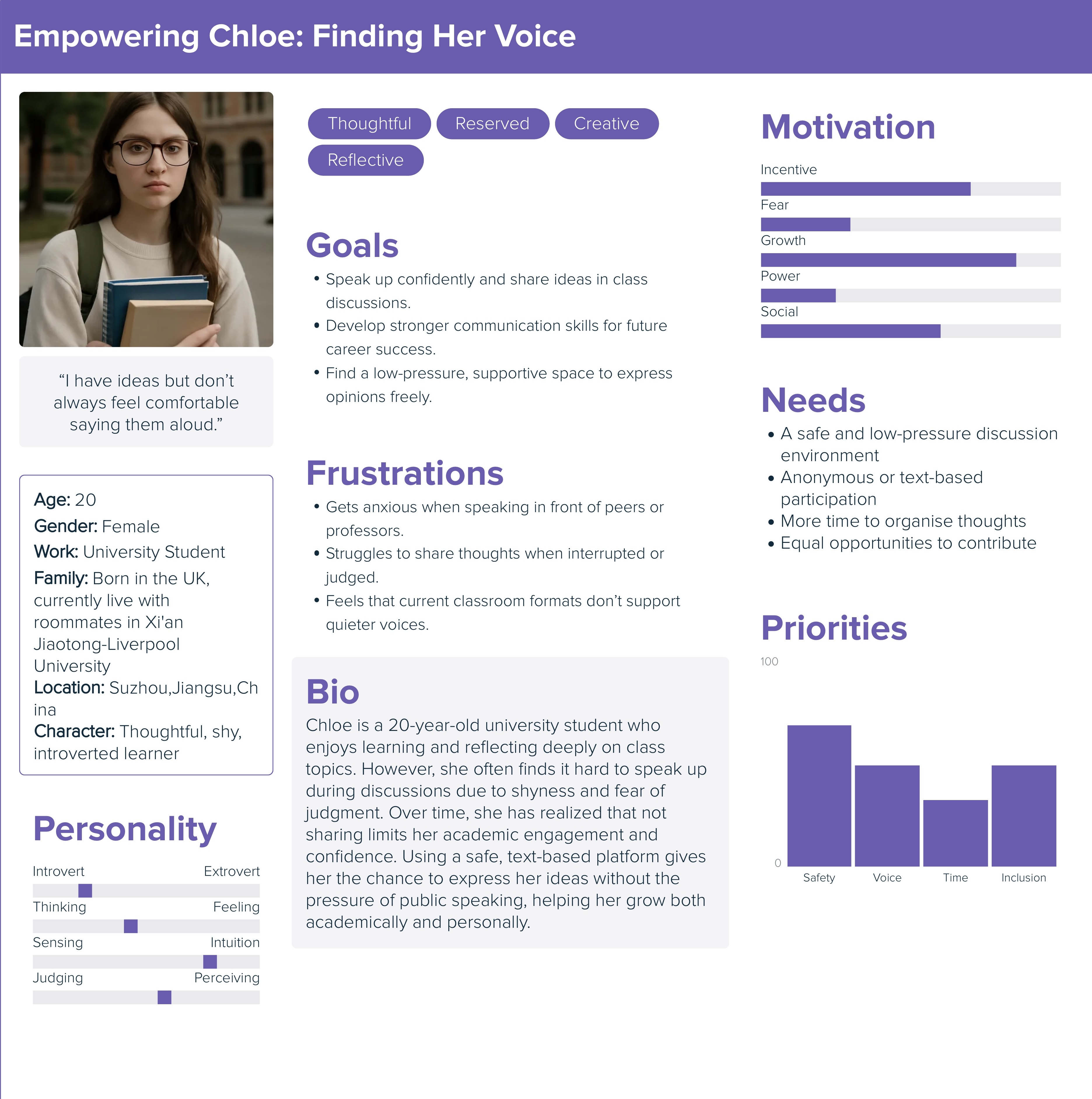
Chloe persona
Fig.1. Chloe persona
Student Persona
Chloe โ€” The Silent Contributor
๐ŸŒท
๐Ÿง  Thoughtful ๐Ÿคซ Introverted ๐Ÿ’ฌ Needs low-pressure participation
Personality
Quiet but reflective
Main Goal
Contribute without pressure
Pain Point
Gets overshadowed by louder peers
Design Opportunity
Safer entry into discussion
๐Ÿ“˜ Background

Chloe is a thoughtful and academically strong university student. She usually has useful ideas during group discussions, but she is naturally introverted and often needs a little more time to organise her thoughts before speaking.

โš ๏ธ Key Challenges

In fast-paced classroom conversations, Chloe often finds that more confident or outspoken classmates respond first. Even when she has a good point, she may stay silent because she worries about interrupting others, expressing herself imperfectly, or being judged by the group.

๐ŸŒฑ Needs

Chloe needs a communication environment that feels safer and less pressuring. She would benefit from a system that allows her to participate in a quieter way, such as through anonymous or text-based input, while still making her ideas visible and valued.

โœจ How the system helps

Our platform gives Chloe an alternative channel to contribute her opinions without depending entirely on live verbal expression. This reduces anxiety, increases her willingness to participate, and helps ensure that thoughtful but quieter students are not overlooked.

โ€œI want to contribute, but I need a little more time and a little less pressure.โ€
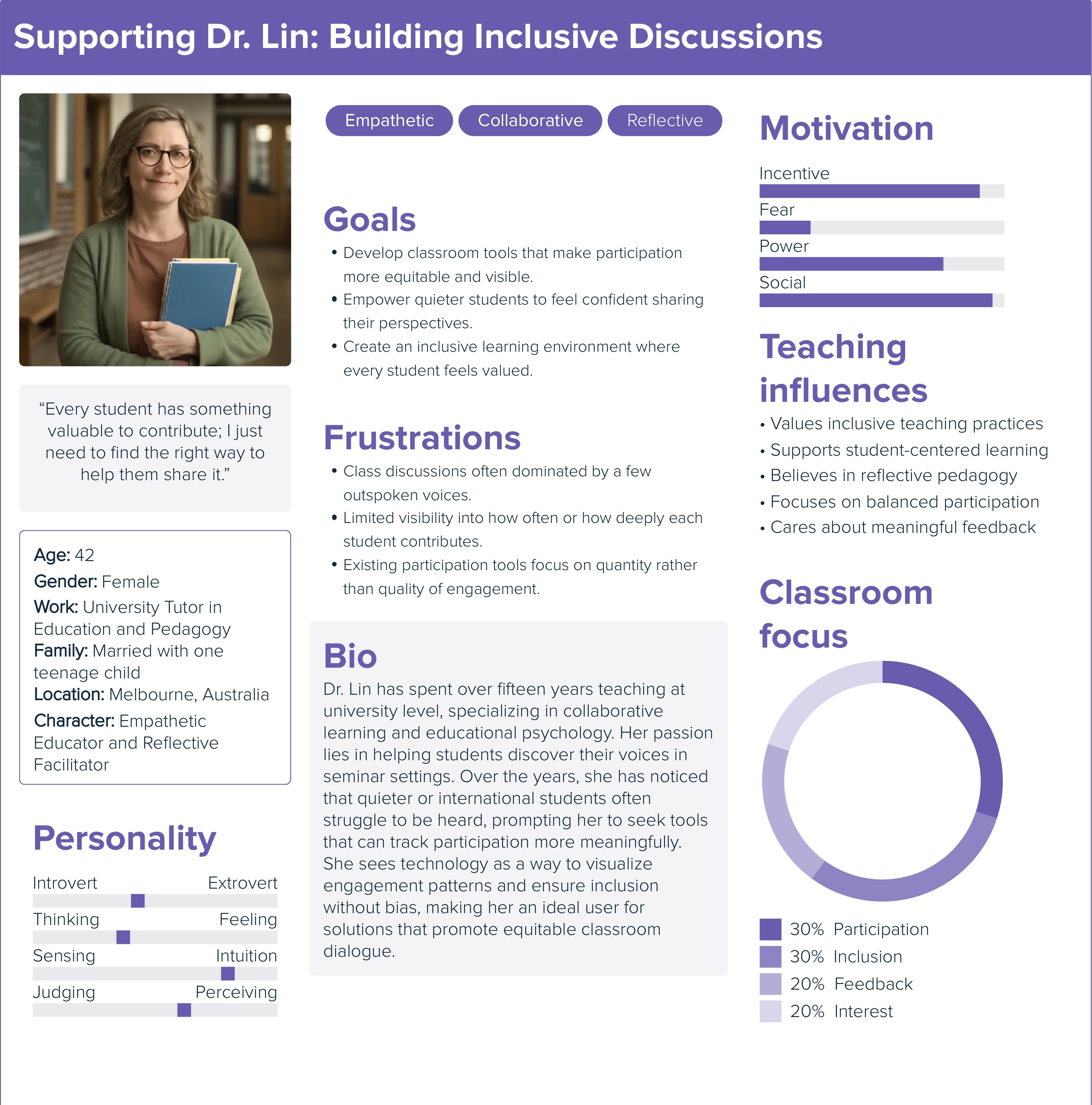
Dr. Lin persona
Fig.2. Dr. Lin persona
Teacher Persona
Dr. Lin โ€” The Data-Driven Educator
๐Ÿ“Š
๐ŸŽ“ Inclusive teaching ๐Ÿ“ˆ Analytics-aware ๐Ÿ‘€ Needs classroom visibility
Teaching Style
Active and student-centred
Main Goal
See who is actually participating
Pain Point
Hard to monitor all groups at once
Design Opportunity
Real-time visibility and intervention
๐Ÿ“˜ Background

Dr. Lin is an experienced tutor who values active learning and meaningful classroom interaction. She wants discussions to involve all students, not just the most vocal members of the class.

โš ๏ธ Key Challenges

During traditional discussions, it is difficult for Dr. Lin to accurately judge who is truly engaged, who is being left out, and whether the conversation reflects a wide range of perspectives. Valuable ideas from quieter students can easily remain invisible.

๐ŸŒฑ Needs

Dr. Lin needs a practical way to monitor participation, identify communication patterns, and understand the overall quality of group discussion without interrupting the natural flow of teaching.

โœจ How the system helps

The system provides structured participation data and discussion insights, allowing Dr. Lin to see which students are contributing, which voices may be underrepresented, and how classroom interaction can be improved.

โ€œI do not just need more participation โ€” I need to understand who is being heard, and who is not.โ€
User Journey Map

How users experience the system step by step.

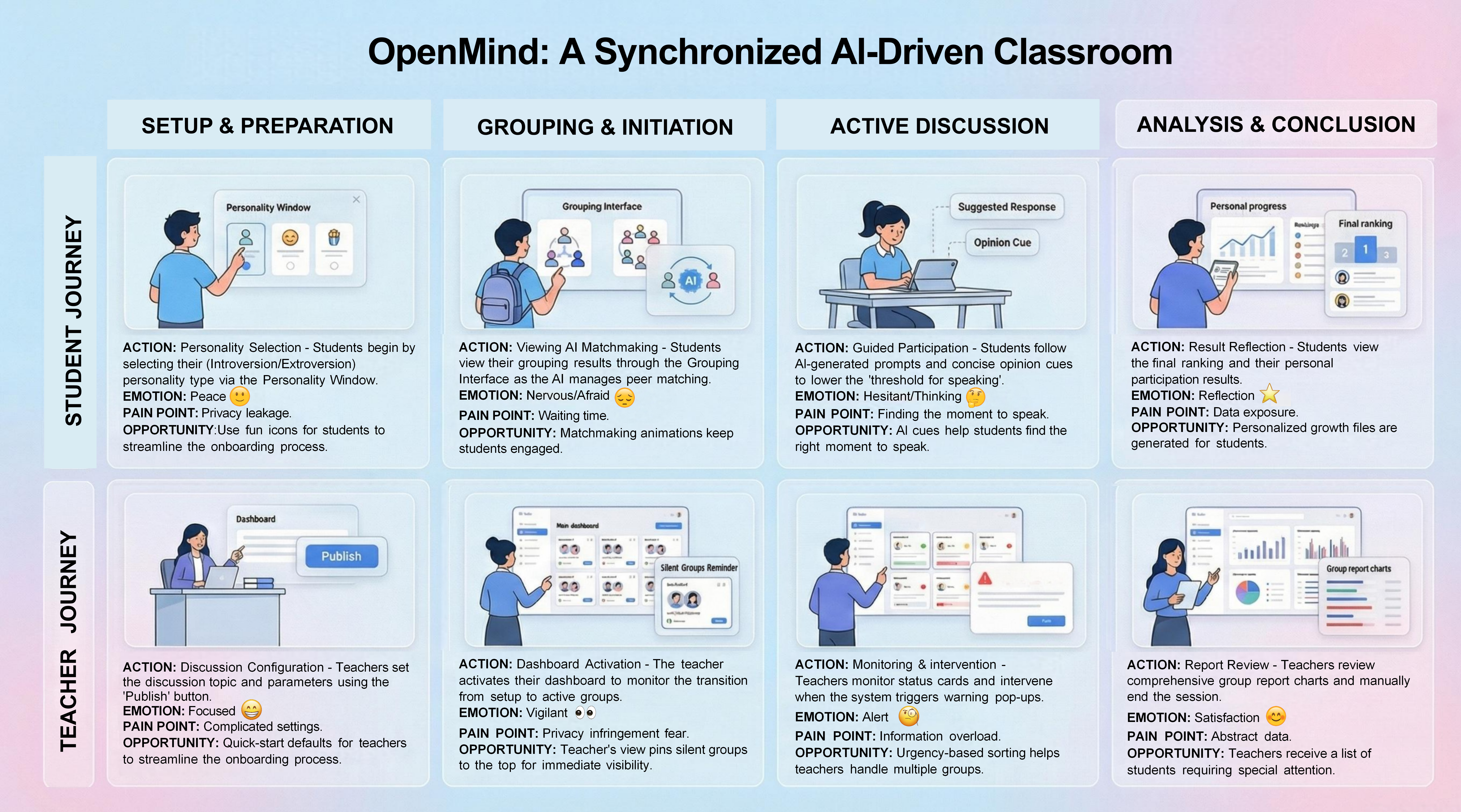
This journey map illustrates the key stages, actions, feelings, pain points, and opportunities across the discussion support experience in one integrated view.

Integrated user journey map
Fig.3. User journey map
User Journey Map

This unified journey map illustrates the parallel, connected experiences of students and teachers throughout the discussion. It shows how a student moves from platform entry to active participation, feedback reception, and contribution reflection, while simultaneously showing how the teacher monitors participation, interprets discussion patterns, and fosters a balanced, inclusive classroom process.

Reflection from Survey and Interview

What we learned and reflected on.

This section presents the key issues, insights, and methodological reflections drawn from our survey and interview findings.

01
๐Ÿ“

Survey Design and Ethical Issues

๐Ÿ“‹ Ethics ๐Ÿงช Pilot study ๐Ÿ“Š 73% response

Our initial survey design lacked formal ethical considerations. We failed to include an Informed Consent Form and a Participant Information Sheet, which are essential for transparency. Additionally, the questionnaire skipped easy warm-up questions and moved directly into core issues, such as group members idling, reported by 73% of respondents. This abrupt approach may have affected the quality of responses. In the future, a pilot study should be conducted to refine the question flow and improve the ease of learning for participants.

02
๐ŸŽ™๏ธ

Interview and Academic Research Refinement

๐ŸŽค Interview ๐Ÿงญ Heuristic evaluation ๐Ÿ“Š 57% response

During interviews with the tutor and peers, we relied too heavily on rigid scripts. We realised that a semi-structured interview approach would have been more effective in exploring the awkward atmosphere, noted by 57% of participants, in greater depth. Furthermore, our review of academic sources and existing products highlighted the lack of heuristic evaluation in many current tools. In particular, many tools fail the visibility of system status principle because they do not clearly show who is contributing in real time.

03
๐Ÿ”—

The Role of Triangulation

๐Ÿ”— Triangulation ๐Ÿ“ˆ 100 surveys ๐Ÿ“Š 17% response

The most significant lesson we learned was the importance of triangulation. We combined quantitative data from 100 survey responses, qualitative insights from tutor interviews, and analytic evaluation from literature and product reviews. By using this multi-method approach, we were able to cross-verify our findings. For example, while the survey quantified the frequency of slackers, the interviews explained one root cause as a lack of clear task allocation, reported by 17% of participants. This reduced the bias of relying on a single method and provided a more reliable foundation for our requirements.

04
๐Ÿš€

Future Improvements

๐Ÿš€ Improvement ๐Ÿง  Cognitive walkthrough ๐Ÿ’ฌ Better feedback

To improve our product, we plan to implement a cognitive walkthrough. By stepping through specific tasks from the userโ€™s perspective, we can identify exactly where communication breaks down and ensure that the interface provides the necessary feedback to keep group discussions productive, inclusive, and engaging.

Ideation & Alternatives

How early ideas evolved into a more focused direction.

This section captures our exploratory design process, from rapid sketching and alternative concepts to a clearer low-fidelity prototype direction.

The Crazy Eights
Eight rapid sketches used to explore different interface directions.
Ideation icon

These early hand-drawn sketches helped us generate multiple interface possibilities quickly, compare different layouts, and surface promising ideas before moving into digital prototyping.

Low-fidelity sketch 1
Fig.4. Sketch 1
Low-fidelity sketch 2
Fig.5. Sketch 2
Low-fidelity sketch 3
Fig.6. Sketch 3
Low-fidelity sketch 4
Fig.7. Sketch 4
Low-fidelity sketch 5
Fig.8. Sketch 5
Low-fidelity sketch 6
Fig.9. Sketch 6
Low-fidelity sketch 7
Fig.10. Sketch 7
Low-fidelity sketch 8
Fig.11. Sketch 8
Design Alternatives
Alternative approaches to tracking student speaking time.
Alternatives icon

We compared three different ways the system could record student speaking duration, then selected the approach that best balanced reliability, student engagement, and practical classroom use.

Alternative 01
Automatic voice detection timing

The browser captures microphone audio in real time, but this method may misinterpret environmental noise, breathing sounds, or soft murmurs as valid speech.

Alternative 02
Fixed turn-taking with set speaking durations

Each student is given a fixed amount of speaking time per round, but this does not accurately reflect the level of genuine participation or contribution during discussion.

Alternative 03
Manual timing through student interaction

Students manually click buttons to mark the start and end of their speeches, and the system automatically calculates the total speaking duration for each participant.

Final choice: Manual timing, as it offers a clearer and more reliable balance between accuracy, active participation, and practical classroom use than either automatic detection or fixed speaking turns.
Low-Fi Prototype
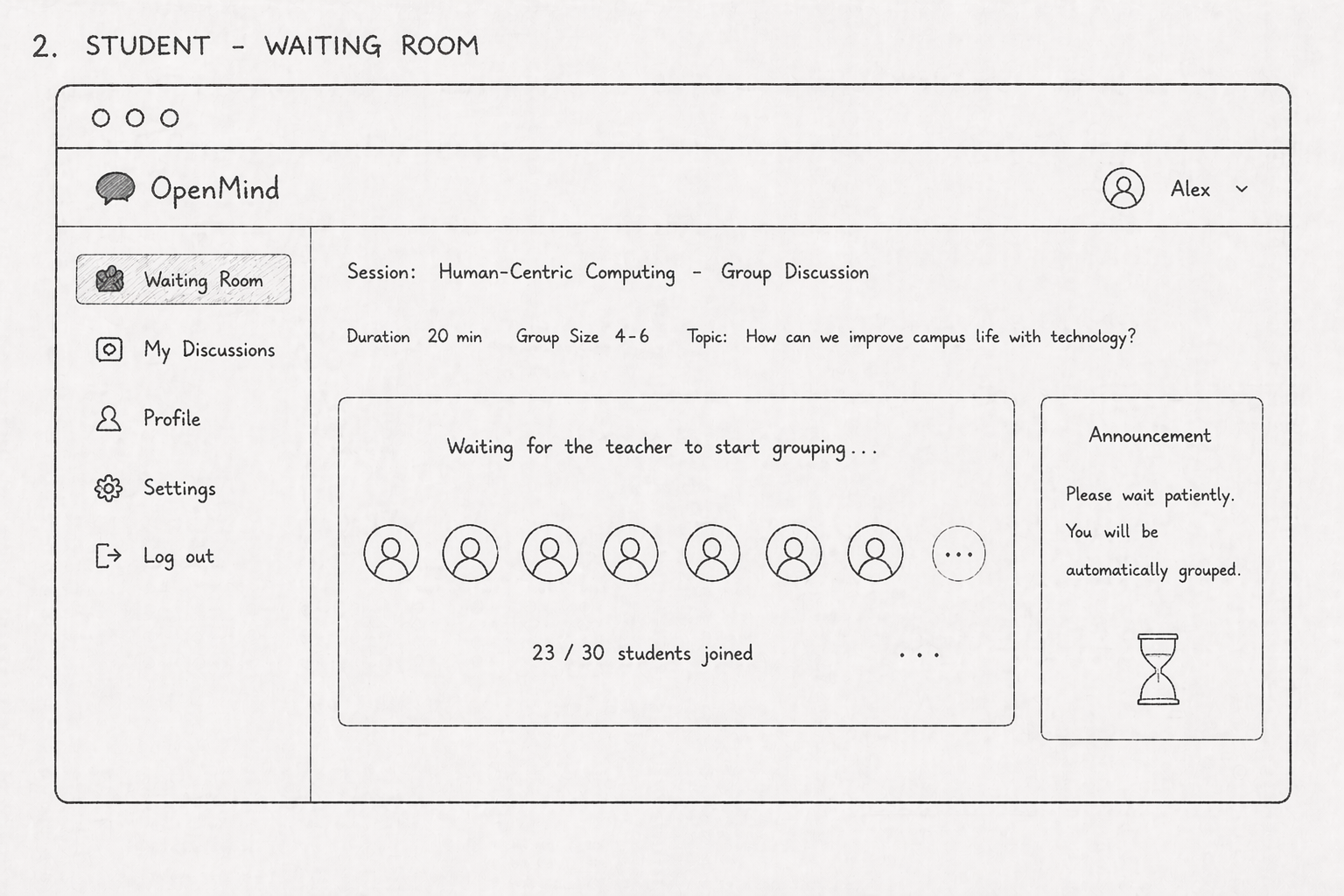
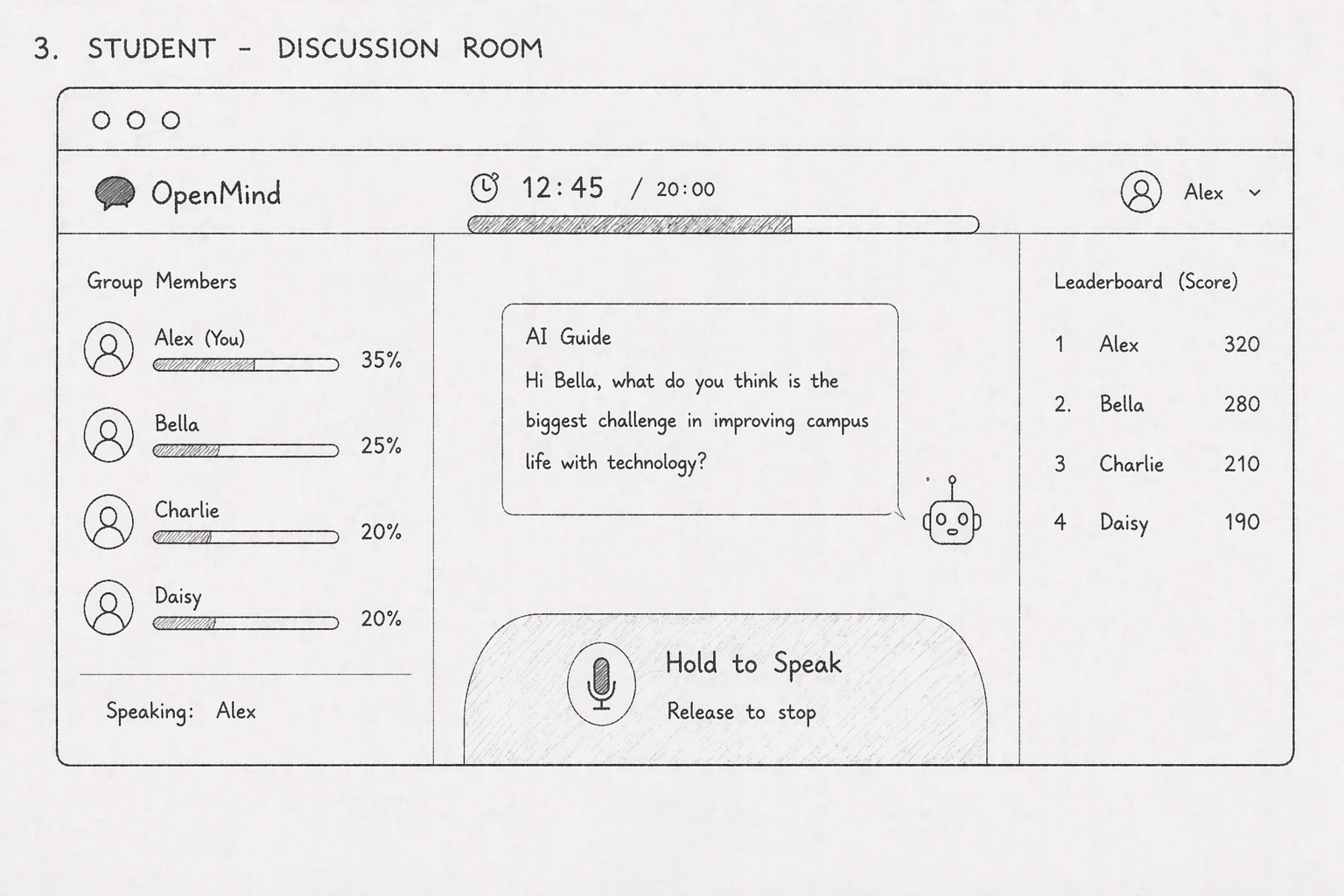
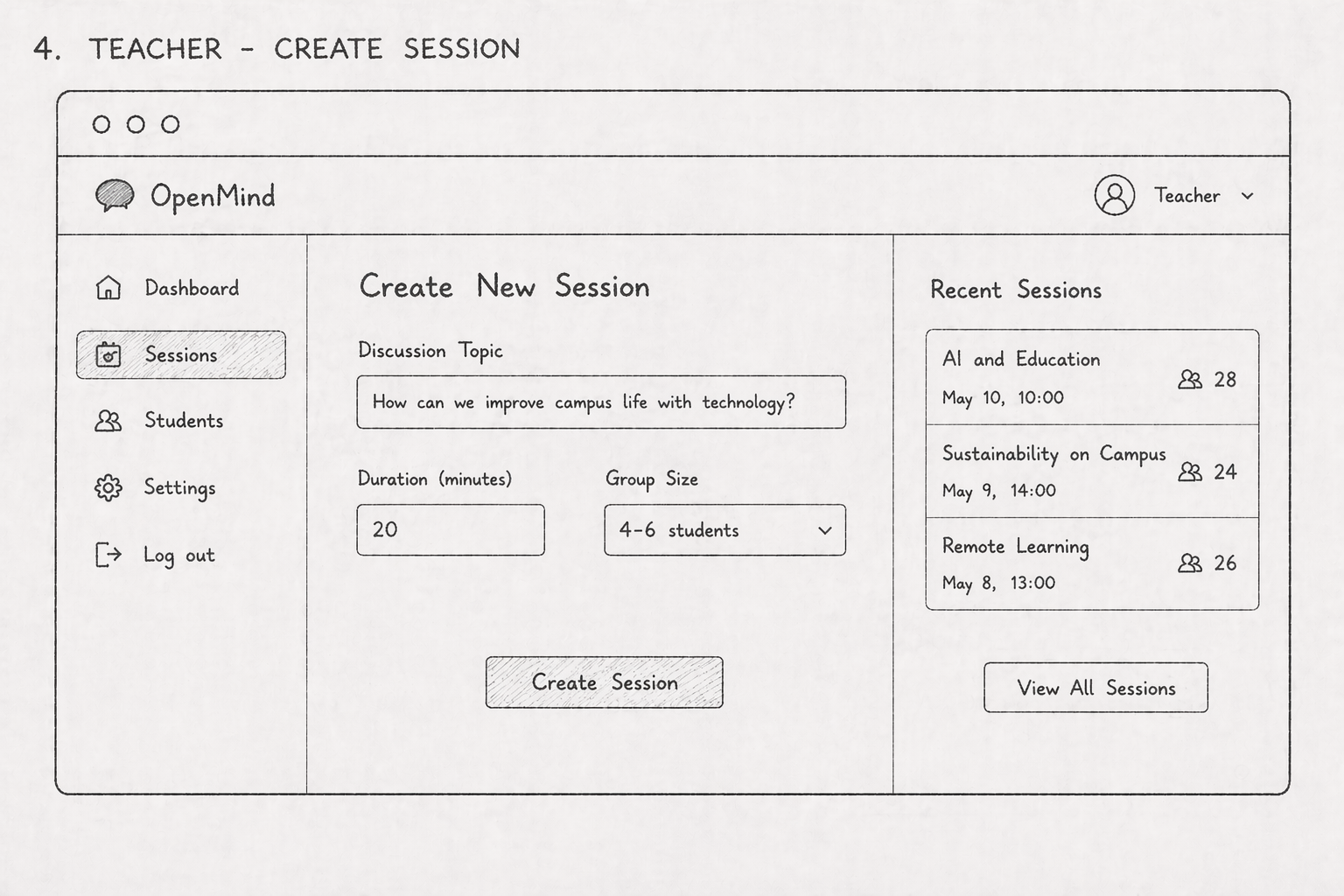
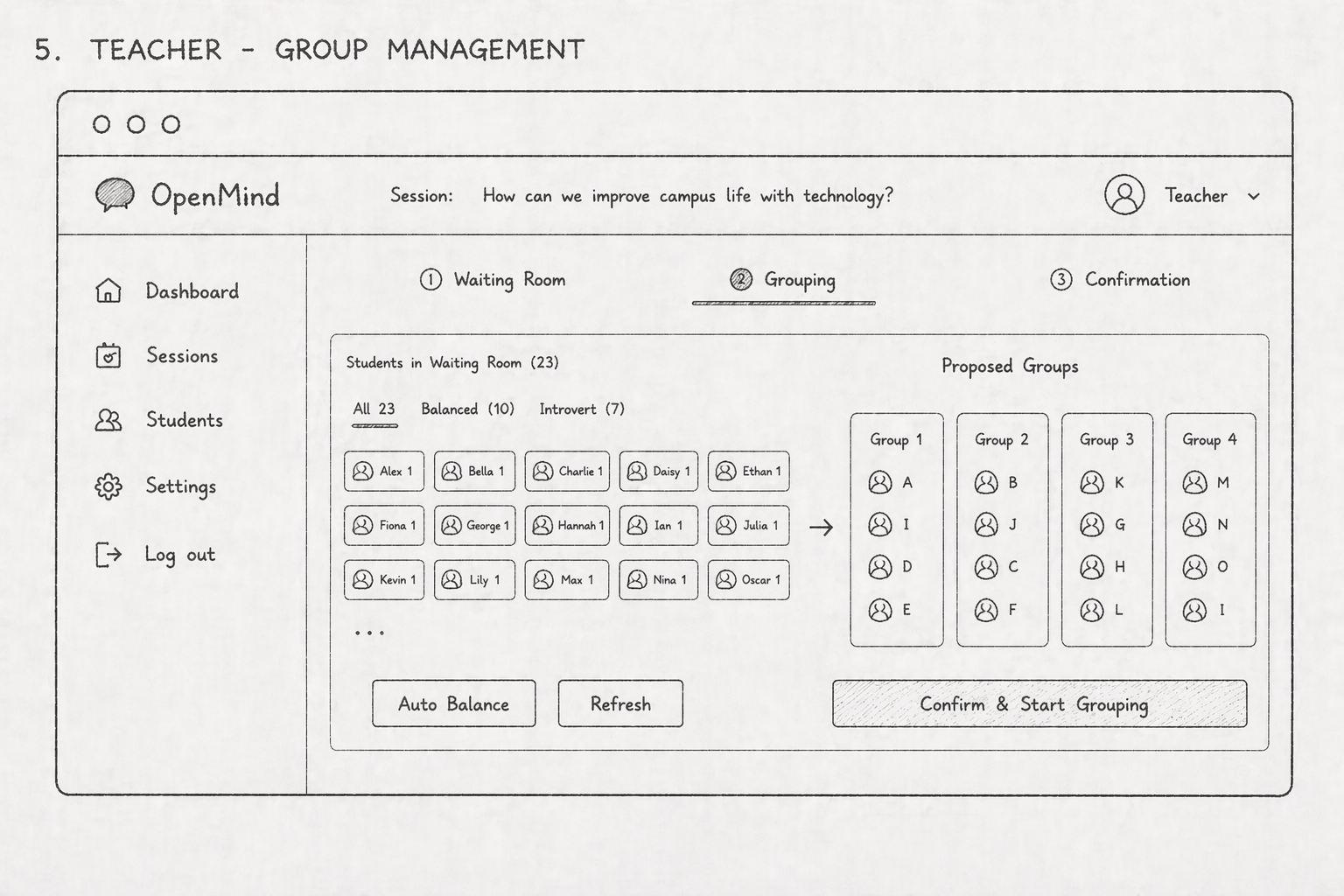
Clickable low-fidelity prototype for exploring the early system flow.
Prototype icon

After comparing alternatives, we translated the most promising ideas into a low-fidelity clickable prototype to test structure, task flow, and interaction clarity.

Technical Implementation

How the system is structured behind the interface.

This section introduces the technical side of the project, including the system architecture, prototype access, and a summary of implementation contributions.

System Architecture Diagram
End-to-end structure of the discussion support system.
Coding icon

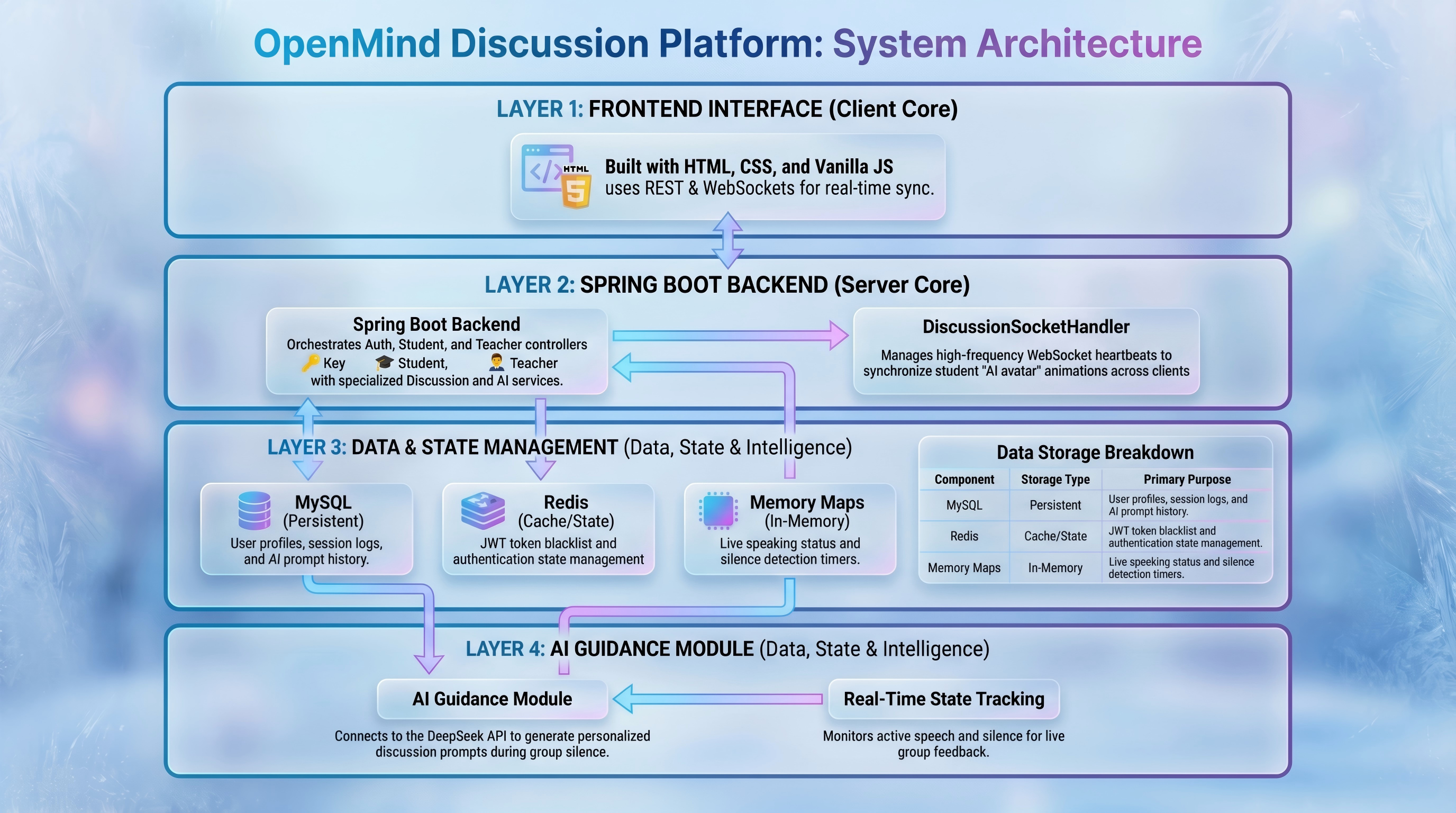
This architecture diagram presents the key technical components of our solution and how data, interfaces, and user-facing functions connect across the full system workflow.

System architecture diagram
Fig.12. Architecture diagram
High-Fidelity Prototype URL
A quick invitation to explore the prototype yourself.
Message icon

Instead of only describing the interface, we provide direct access to the high-fidelity prototype so viewers can step into the interaction flow and experience the concept more actively.

Do you want to try the prototype and see how the discussion experience works in action?
Tap the entry point, explore the flow, and imagine how students and teachers would interact in a real classroom setting.
Interactive Preview

Open the prototype and take a quick look around.

Try the prototype
http://111.170.157.76:9527/pages/login.html
System Evaluation

How user testing shaped the Alpha version.

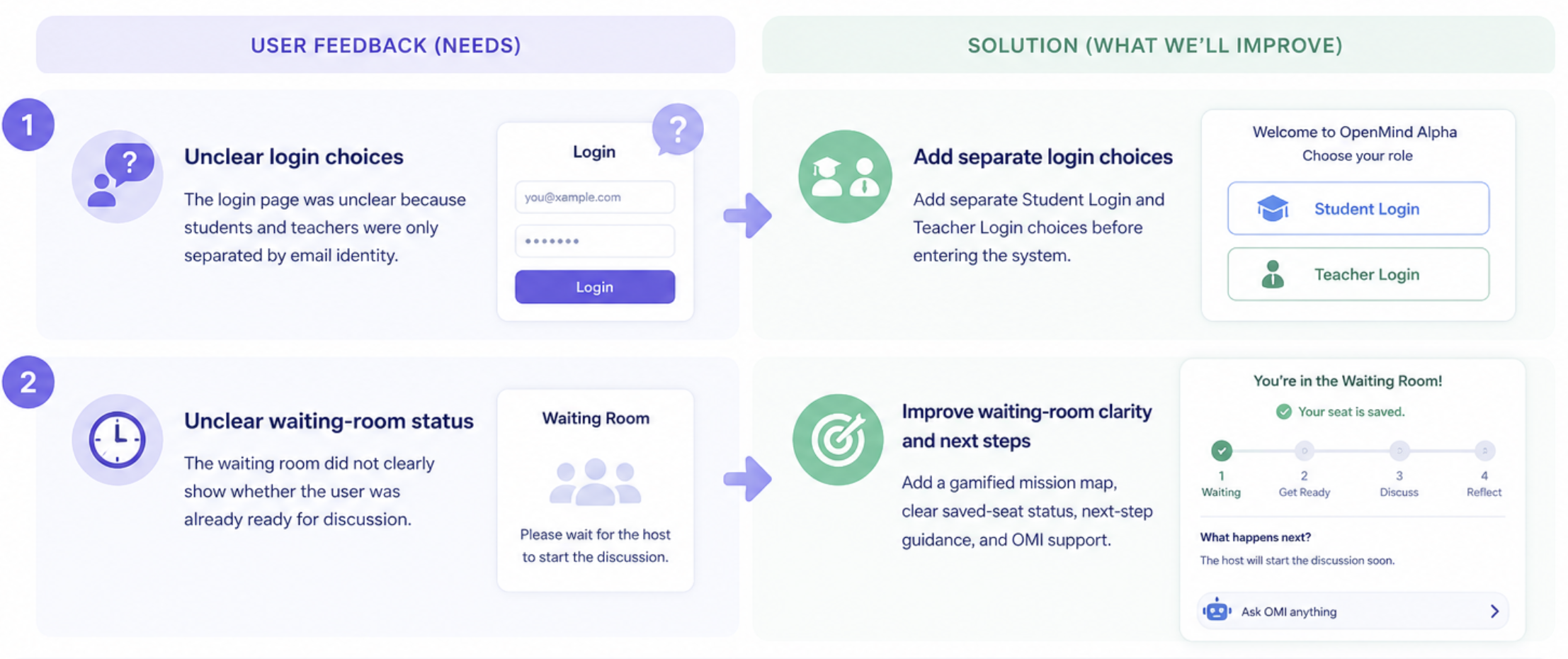
Three teacher-student groups tested the OpenMind Alpha system. Their feedback helped us find two unclear moments: choosing the correct login role and knowing whether the waiting-room step was complete.

Discoveries
User feedback that guided our design changes.
Key findings icon
Evidence Chain
How feedback led to refinement and evaluation evidence.
Evidence chain icon
Feedback Refinement Evaluation
Feedback
Refinement
Evaluation Evidence
F1 Login Clarity

The login page did not clearly separate student and teacher roles.

R1 Role Choice

Add separate Student Login and Teacher Login paths before sign-in.

E1 Before / After

The revised login shows role selection first, making the correct path easier to identify.

F2 Room Status

The waiting room did not clearly show whether the user had joined and was ready.

R2 Progress Map

Add "Seat saved", a mission route, next-step guidance, and OMI support.

E2 Scenario Check

The refined waiting room makes the joined state and next action visible during testing.

Alpha Testing
Three teacher-student groups tested the Alpha prototype.
Alpha testing icon
User feedback Alpha prototype Login clarity Waiting room

The Alpha test involved three groups of teachers and students using the system in a classroom-discussion scenario.

Their feedback was used to revise the login flow and waiting-room experience.

Iterative Refinement
Before-and-after changes based on user feedback.
Iterative refinement icon
Before After Waiting room Need help?

We added clearer role choices so students and teachers can enter through different login paths.

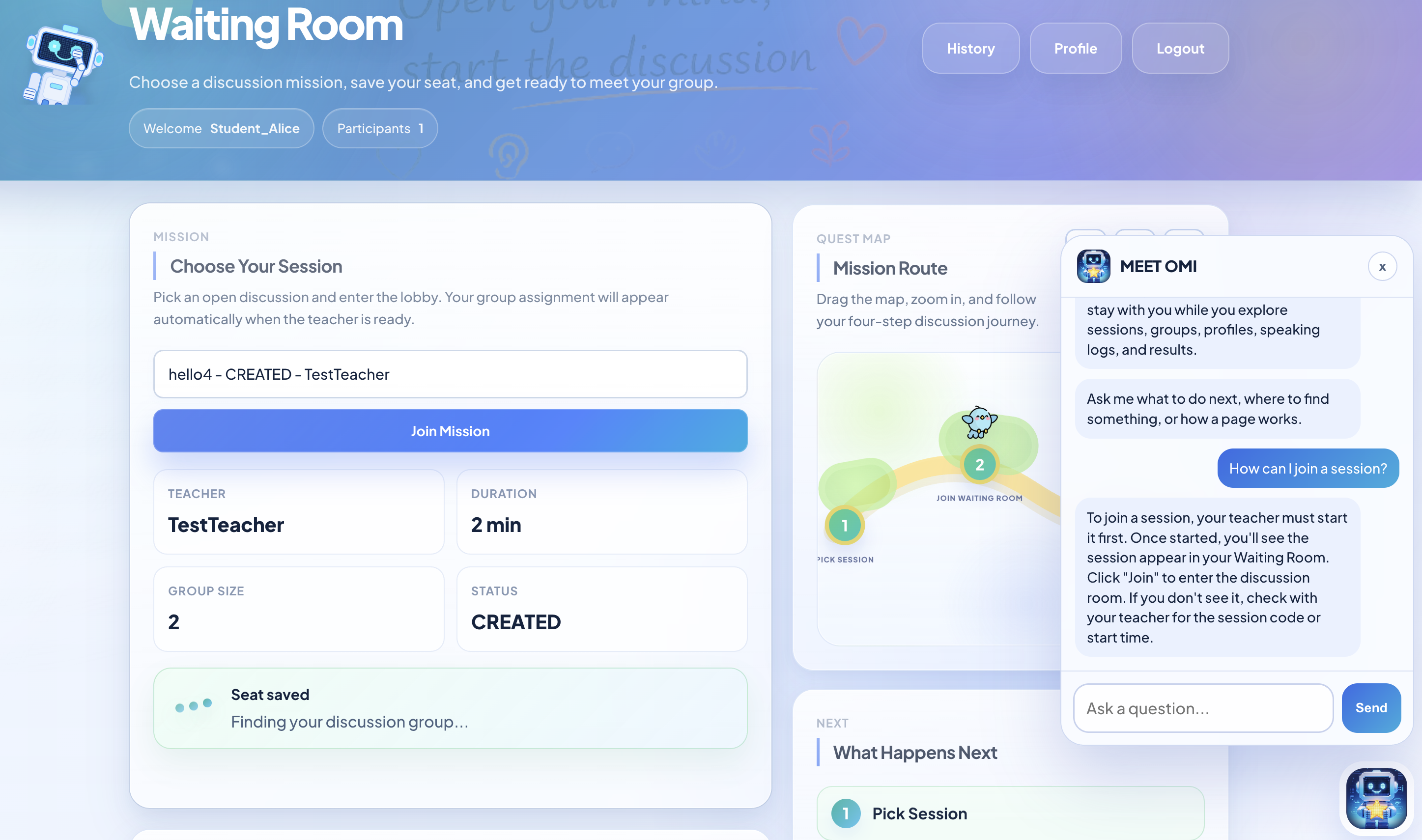
We also changed the waiting room into a guided mission page with "Seat saved", a mission route, next-step guidance, and OMI support.

User Feedback and Solution
A full-size summary of the design changes.
Feedback and solution summary icon
Before and after summary of waiting room iterative refinement
Fig.13. Iterative refinement summary
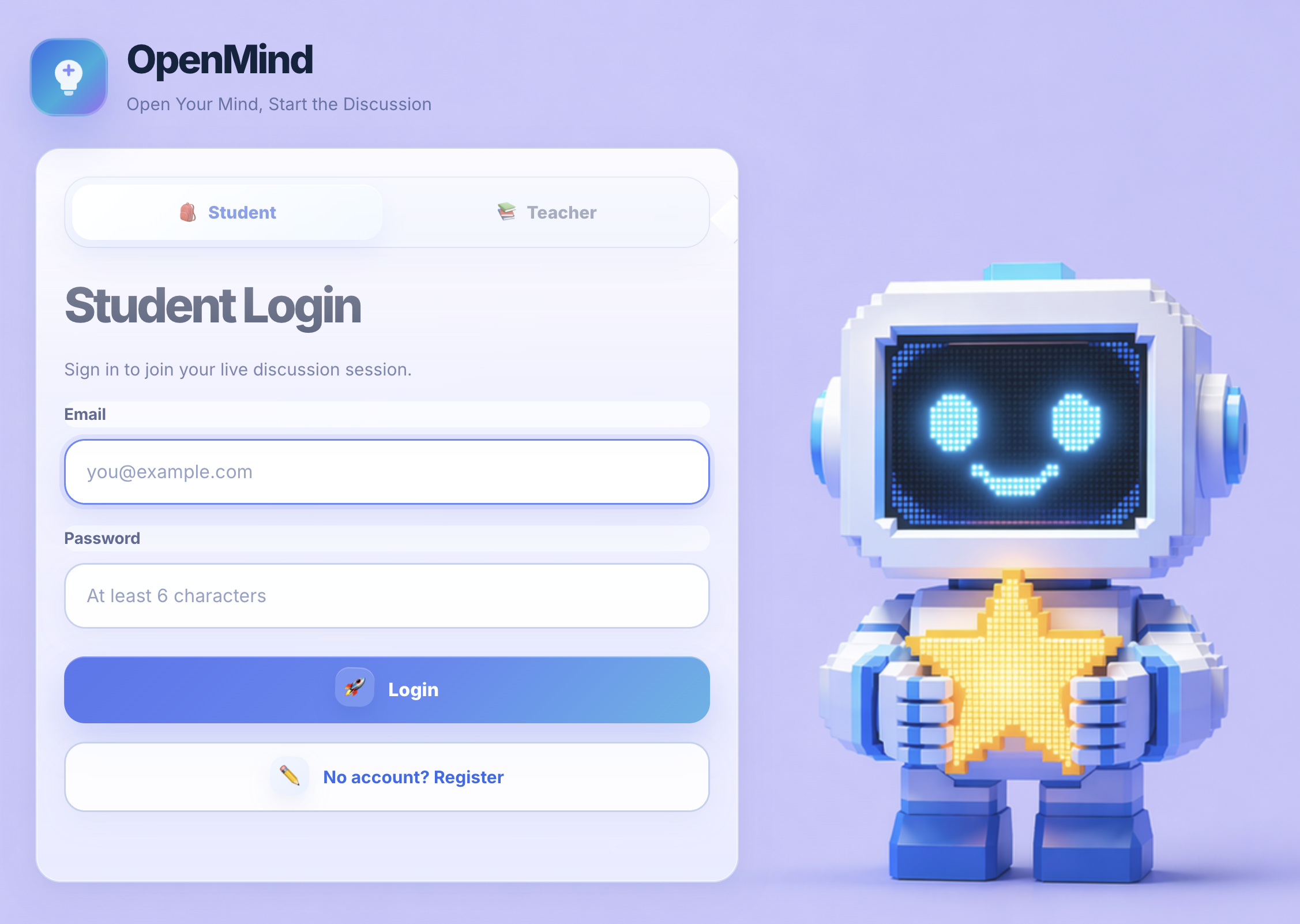
Login Before
Original login did not separate user roles clearly.
Login before screenshot icon

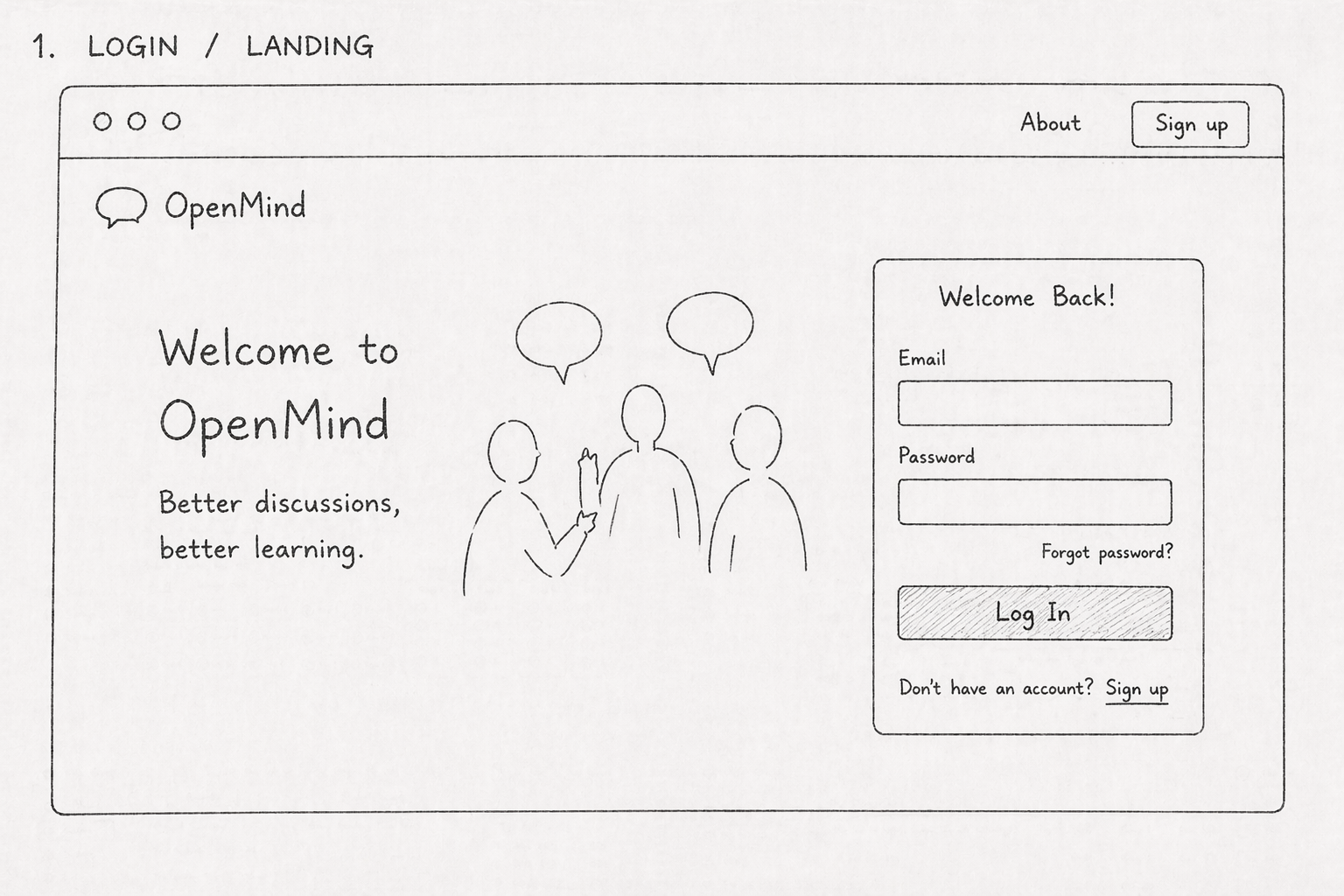
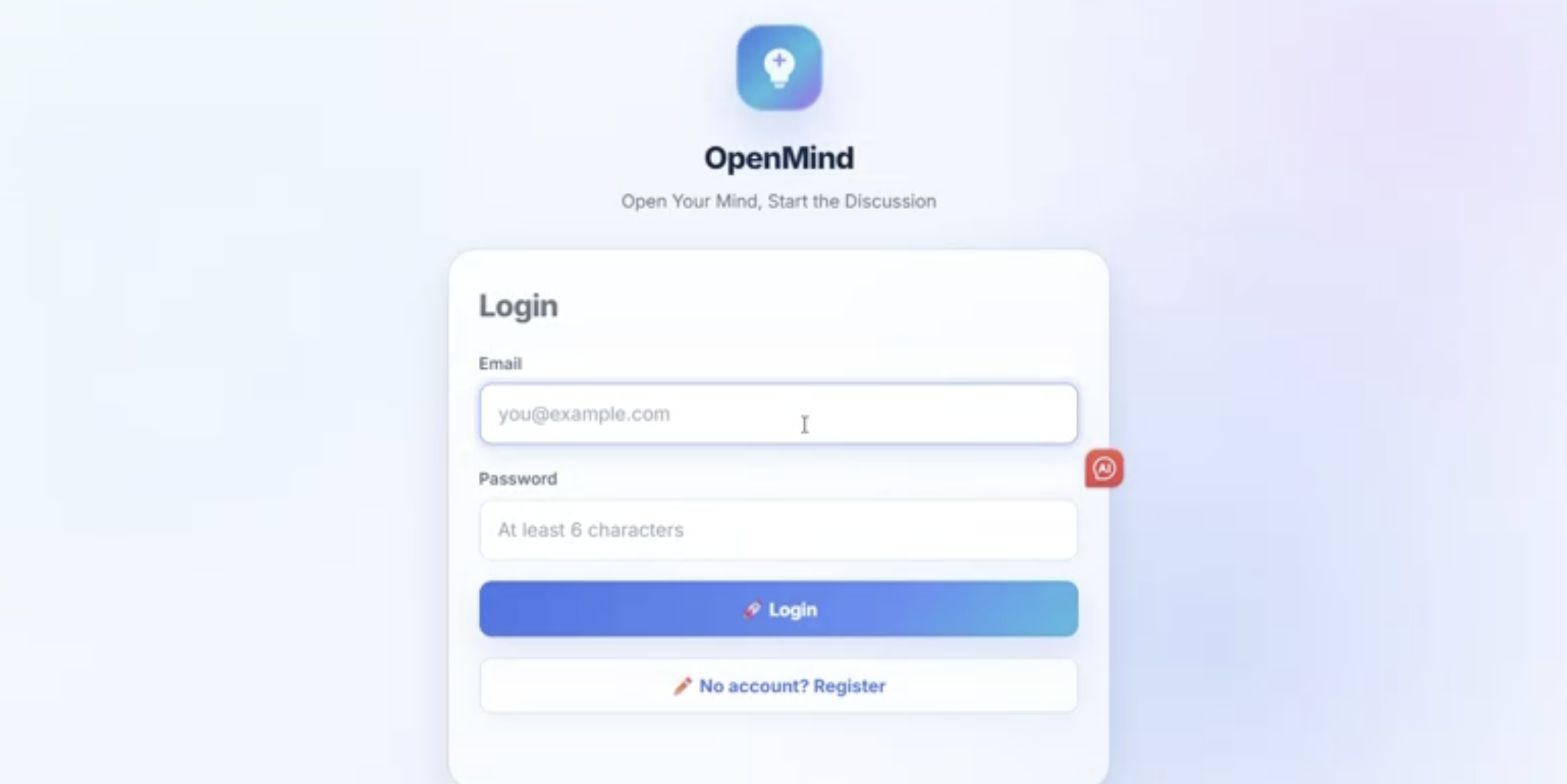
The earlier login page used one shared form, so students and teachers had to be identified mainly through email.

Original login interface before role selection refinement
Fig.14. Original login interface
Login After
The revised login provides separate role choices.
Login after screenshot icon

The updated version lets users choose Student or Teacher first, making the correct path clearer before sign-in.

Refined login interface with separate student and teacher choices
Fig.15. Refined login interface
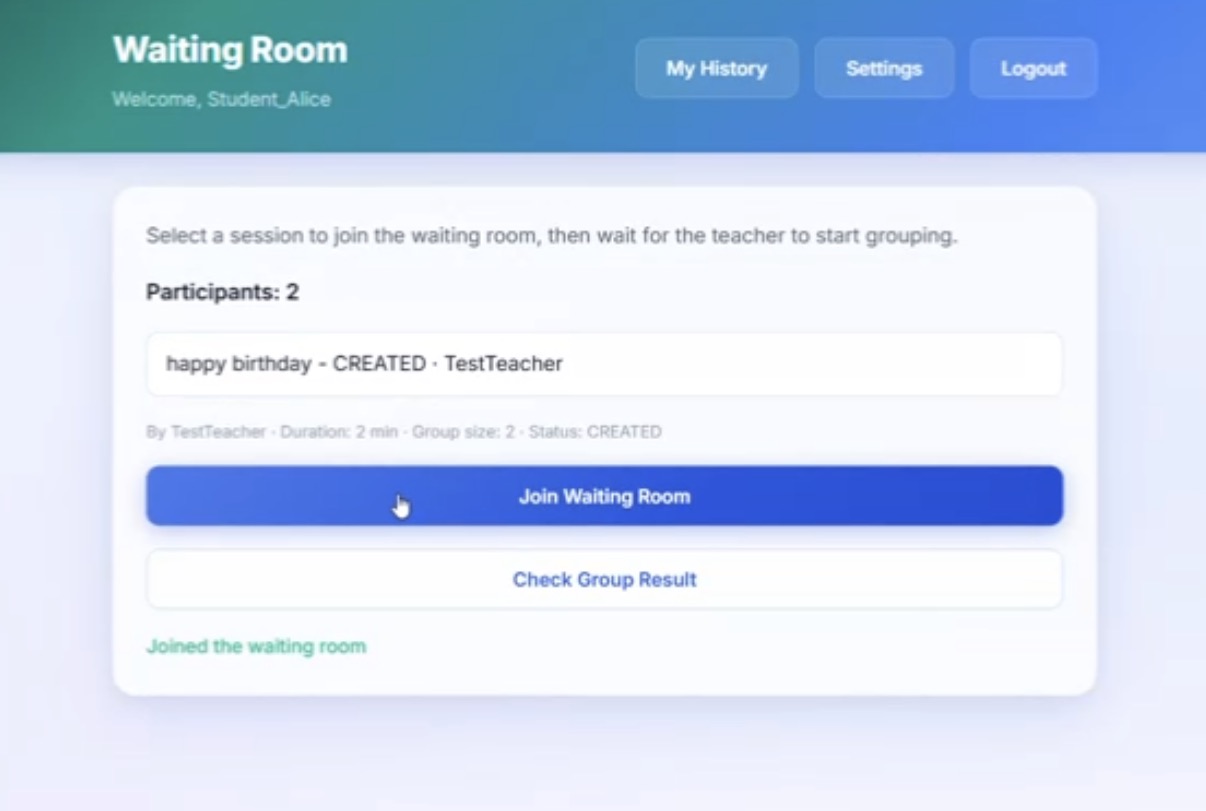
Waiting Room Function Before
Original waiting room did not show readiness clearly.
Before screenshot icon

The earlier version showed session details, a join button, and a small "Joined the waiting room" message. User feedback suggested that this did not strongly communicate progress or explain what should happen after joining.

Original waiting room interface before refinement
Fig.16. Original waiting room interface
Waiting Room Function After
The revised waiting room shows status, route, and help.
After screenshot icon

The updated version makes the joined state more visible through "Seat saved", displays the current mission route, explains the next step, and keeps OMI available for immediate guidance.

Refined waiting room interface after user feedback
Fig.17. Refined waiting room interface
Evaluation Snapshot
Visual summary of testing outcomes after refinement.
Visual summary icon
Evaluation and impact summary board
Fig.18. Evaluation summary
๐ŸŽ“

For Students

Reduces uncertainty by showing clearer room status, participation cues, and timely AI prompts.

๐Ÿง‘โ€๐Ÿซ

For Teachers

Makes it easier to monitor group readiness and spot when students may need support.

๐Ÿ“Š

For Classroom Practice

Turns user feedback into practical interface changes that support a smoother discussion process.
Final Reflection
Social and ethical reflections on the design.

Final reflection icon

OpenMind aims to support fairer classroom discussion by making participation more visible. However, the system should not reduce students to numbers or treat speaking time as the only measure of contribution. Some students may participate through listening, note-taking, or careful short responses, so the data should support reflection instead of creating pressure or unfair labels.

We also considered privacy, consent, and transparency. Students and teachers should know what participation data is collected, why it is collected, and how long it will be kept. The system should make its purpose clear, protect classroom data carefully, and leave final interpretation to the teacher rather than making automatic judgements about student performance.

AI Document

Detailed AI usage notes, prompts, and reflection.

Click the button below to view a separate document with our AI prompts, reference notes, and reflection on how AI supported the portfolio process.

View AI document
Personal Contribution

A shared project shaped by complementary strengths across the team.

Each team member contributed to both design thinking and project delivery, but with different areas of emphasis. The overview below highlights the main responsibilities that helped move the work from research and ideation to implementation, testing, and final presentation.

Document icon
Hongyu Qiu
Visual communication and supporting written content
Student ID: 2363102
Poster & Content

Hongyu focused on shaping how the project was communicated clearly and professionally across presentation materials.

  • Led the poster design to establish a clear and engaging visual presentation.
  • Wrote the introduction and conclusion to strengthen the overall narrative flow.
  • Organised and integrated academic resources to support the project rationale.
Test icon
Muyang Li
Portfolio experience, evaluation, and testing support
Student ID: 2361477
Portfolio & Testing

Muyang contributed strongly to the portfolio presentation layer while also supporting review and evaluation work across deliverables.

  • Led the portfolio design and helped refine the persona presentation.
  • Carried out system testing together with poster testing and evaluation tasks.
  • Wrote the poster evaluation section and the portfolio evaluation content.
  • Supported system optimisation by adding more interactive and playful design details.
Idea icon
Yiduo Xu
Concept development, prototyping, and early structure planning
Student ID: 2362146
Ideation & Prototyping

Yiduo played a key role in moving the concept from early structure into visualised prototype work.

  • Wrote the poster design and structure section to clarify the concept direction.
  • Produced the Figma low-fidelity and high-fidelity prototypes.
  • Refined the personas and contributed to the portfolio ideation write-up.
Software development icon
Yanan Zhang
System implementation, optimisation, and evidence-based analysis
Student ID: 2363084
Coding & Research

Yanan focused on translating the concept into a working system while also supporting key research interpretation and technical documentation.

  • Led system coding, interface design, and optimisation work.
  • Wrote the poster user requirements section and analysed interview data.
  • Collected and described the targeted users, and drafted the portfolio technical implementation section.
๐Ÿค– Meet Omi
Hi, I'm Omi, your helper.

I am here to guide you through OpenMind, highlight the key ideas in our project, and make the experience easier to explore from start to finish.